Oleas Font: A Crystalline Display Typeface for Editorial Design
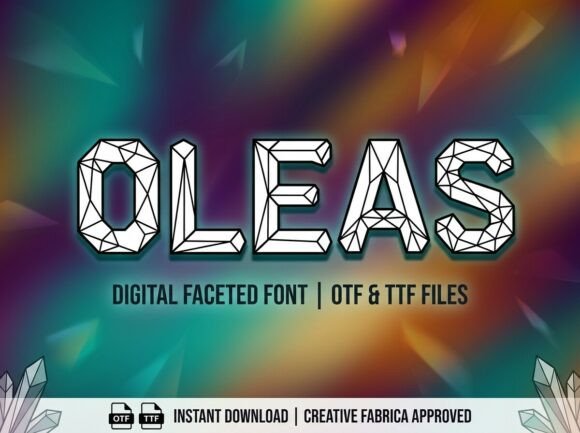
It was a quiet afternoon when I sat down to redesign the header of a digital lifestyle blog. The previous font had grown stale, and I needed something that could refract creative vision while maintaining clarity. That’s when I discovered Oleas — a display font with a prismatic soul, bold sans-serif letterforms, and a rhythm that felt just right for editorial content. In this review, I’ll walk through how Oleas performed in my real-world publishing project and why it might be the perfect typeface for your next layout.
Oleas for Magazine Covers and Digital Publications
Magazine covers demand impact without overwhelming the reader. Oleas delivers a modern yet refined presence that feels both artistic and accessible. Its crystalline structure gives each character an angular elegance, while the bold weight ensures visibility at a glance. When I tested Oleas as a cover title on a digital magazine layout, it immediately elevated the visual hierarchy, drawing attention without shouting.
The geometric nature of Oleas makes it ideal for titles that need to stand out against imagery or abstract backgrounds. It doesn’t lose its shape under pressure — even when layered over textured visuals or gradients, the font maintained legibility and design integrity. For editorial designers working across platforms like web and print, this kind of versatility is essential.
Oleas in Blog Headers and Newsletter Graphics
On the same blog redesign project, I used Oleas for the main header above each article. The sans-serif style gave the site a clean, contemporary feel, while the subtle prismatic details added depth. Readers commented that the new headers felt more intentional — not just decorative, but purposeful in setting the tone for the content below.
In newsletter graphics, where space is often limited, Oleas worked surprisingly well. Its condensed forms allowed me to fit longer headlines into narrow columns without sacrificing readability. I also noticed that the font’s rhythm helped guide the eye smoothly from one section to the next, reinforcing a sense of flow and organization.
Why Oleas Feels Right for Content Branding
Branding in editorial design isn’t always about logos — it’s about consistency in tone and typography. Oleas has a distinct personality that aligns with creative and lifestyle-oriented publications. It’s not too whimsical, nor is it overly serious. Instead, it sits comfortably in the sweet spot between artistry and approachability.
When I applied Oleas to pull quotes within long-form articles, it created a natural focal point that enhanced the reading experience. The bold sans serif construction made it easy to read on screens, while the prismatic quality gave it enough visual interest to justify its use in key moments of the text.
Oleas for Recipe Ebooks and Lifestyle Printables
I recently designed a recipe ebook for a wellness brand, and Oleas became my go-to choice for chapter openers and feature titles. The font’s premium feel matched the brand’s aesthetic — clean, modern, and slightly luxurious. While some display fonts can feel too stylized for functional content, Oleas retained its usability thanks to its balanced proportions and strong x-height.
For printable planners and worksheets, Oleas proved useful in section headings and decorative accents. Its boldness helps break up dense layouts, making navigation easier for users. However, I found that using Oleas for body copy or small captions didn’t work as well; it’s simply too expressive for those smaller-scale applications. Stick it to the big stuff — the titles, the headers, the impactful calls to action.
Font Pairing Ideas with Oleas
To maintain readability in layouts where Oleas takes center stage, I recommend pairing it with a clean, neutral sans serif or a classic serif font for body text. In my blog redesign, I paired Oleas with a simple Georgia-based serif for article intros and a minimalist Helvetica-style font for navigation menus. This combination preserved the editorial mood while ensuring the rest of the text remained comfortable to read.
Here are a few practical pairings I’ve tested:
- Oleas + Lora: A great match for digital magazines and lifestyle blogs where contrast matters.
- Oleas + Open Sans: Keeps things fresh and modern for newsletters and course PDFs.
- Oleas + Merriweather: Adds warmth and sophistication for wedding guides or coaching workbooks.
Oleas in Course PDFs and Coaching Workbooks
When building a downloadable course PDF, I wanted a title font that would reflect the professionalism and creativity of the material. Oleas brought a unique energy to the table. It wasn’t just another display font — it had character, both literally and figuratively.
I used Oleas for section headings and worksheet titles, which helped differentiate content blocks without disrupting the overall flow. The font’s boldness ensured that these elements stood out clearly, especially in black-and-white print versions. I also appreciated the included alternates and ligatures, which let me personalize certain sections without compromising legibility.
However, for the actual instructional text in the workbook, I switched to a more subdued typeface. Oleas is best reserved for titles, callouts, and other display uses where it can shine without becoming distracting.
Readability Considerations Across Platforms
Oleas performs admirably on screen, particularly on high-resolution displays. Its crisp edges and generous spacing make it highly legible in both mobile and desktop environments. But when exporting to PDF or preparing for print, I made sure to test the font at different sizes and weights to ensure it held up in all contexts.
While Oleas is excellent for large formats like magazine covers or blog headers, it’s important to avoid using it in dense paragraphs or tiny captions. Its expressive nature is best suited for short, impactful phrases rather than lengthy reading passages. If you're considering Oleas for a publication, check the licensing to confirm whether it supports commercial use for your specific platform — whether that's selling digital downloads or embedding in client projects.
Editorial Mood and Publication Identity with Oleas
One of the most compelling aspects of Oleas is how it subtly influences the mood of a publication. It brings a sense of structured creativity — the kind of look that says “this is carefully curated” without feeling rigid. Whether you’re working on a wedding guide, a digital magazine, or a printable planner, Oleas adds a touch of sophistication that resonates with readers looking for quality design.
I found that Oleas works especially well in content that blends editorial storytelling with visual design. Its bold, geometric forms complement photography-driven layouts, while its prismatic undertones invite a bit of curiosity. It’s the kind of font that makes your publication feel intentional and stylish, without alienating your audience.
Practical Tips for Using Oleas in Your Projects
Before diving into any layout project, take time to explore what styles and variations Oleas offers. Look for alternate characters, swashes, or stylistic sets that can add nuance to your content. These design assets give you more flexibility when crafting headlines or branding elements.
Also consider file formats — does Oleas come in OTF, TTF, or WOFF? For digital products like newsletters or social media graphics, having multiple options is a plus. And if you plan to sell printables or embed the font in templates, double-check the commercial font license to ensure you have the rights to do so.
Finally, don’t forget to test Oleas in context. Upload it to your CMS or design software and see how it looks in real-life scenarios. How does it render on mobile? Does it export cleanly to PDF? These questions will help you determine whether Oleas fits your workflow and audience expectations.
Oleas as a Creative Font for Modern Typography
There’s no shortage of display fonts out there, but Oleas stands out for its thoughtful construction and rhythmic balance. It’s not trying too hard to be trendy — instead, it feels timeless in its geometry and confident in its form. As someone who regularly works with editorial design, I appreciate that it maintains readability while still expressing a clear typographic identity.
Its appeal lies in the way it refracts light metaphorically through design — guiding the reader’s attention while supporting the content’s message. Whether you're creating a digital magazine, a wedding guide, or a branded newsletter, Oleas can help shape the visual tone of your publication in a way that feels both current and grounded.
If you're looking for a display font that balances beauty and function, Oleas is worth a closer look. It’s not just a pretty face — it’s a tool that can help you craft stronger, more engaging editorial experiences.