Alkee Display Font for Web Design Projects
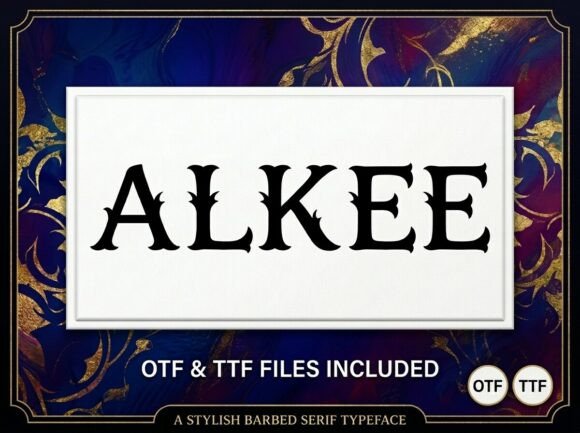
When I was working on a new product landing page for a boutique creative agency, the hero headline just wasn’t grabbing attention. The font we were using felt too safe — it didn’t reflect the brand’s bold and artistic personality. That’s when I decided to test Alkee, a decorative display font that promises to be the center of attention with its unique artistic elements and strong visual presence.
Testing Alkee in a Hero Section
I started by placing Alkee in the main headline of the hero section. Right away, I noticed how it stood out against the background image — it had enough contrast without being overwhelming. The letterforms are expressive but not overly scripty, which is key for a display font used in digital spaces. Unlike some other decorative fonts I’ve tried, Alkee maintains clarity even at smaller sizes, making it surprisingly versatile for more than just massive headers.
What really impressed me was the balance between creativity and legibility. It doesn’t sacrifice readability for style, which is often a concern when working with display fonts. As a UI designer, I always look for that sweet spot where a typeface feels both premium and functional, and Alkee hit it just right in this context.
Using Alkee for Branding and Creative Portfolios
One of the first things I did after confirming it worked well in the hero was to apply Alkee to the client’s logo text and subheadings across the site. The font has a distinct character that helped elevate the brand’s identity from generic to memorable. For a creative portfolio or branding project, having a typeface with such a strong visual personality can make all the difference in standing out among competitors.
I paired Alkees with a clean sans serif body font like Lato to maintain hierarchy and keep the overall design from feeling cluttered. This kind of font pairing is essential in web design — especially when you’re working with a display font. You want to let it shine without overloading the layout. Alkee works best as a headline font, leaving the supporting text to something simpler and easier to read.
Alkee for Landing Pages and Call-to-Action Sections
Landing pages need punch. They have to communicate value quickly and guide users toward a specific action. I found that Alkee added just the right amount of flair to our CTA buttons and feature titles. Its strong visual personality made the content feel intentional and crafted, which subtly boosted brand trust.
- Hero Titles: Bold and expressive, perfect for drawing the eye.
- Feature Headlines: Helps differentiate sections visually without sacrificing clarity.
- CTA Buttons: Works well in short phrases, adding energy and uniqueness.
It's important to note that while Alkee shines in these areas, it’s not ideal for long paragraphs or small mobile buttons. Display fonts are meant to command space, not fill it. But for a course sales page or campaign landing page, it’s an excellent choice for headlines and featured text.
How Alkee Affects Visual Hierarchy and User Engagement
In web design, typography is one of the most powerful tools for guiding user behavior. Using Alkee in key sections helped create a clear visual hierarchy — visitors knew exactly where to look. The contrast between the decorative display font and the minimalist supporting typeface created a sense of order and professionalism, despite the font’s artistic edge.
On mobile layouts, I increased the font weight slightly and adjusted spacing to ensure it remained readable. Display fonts can sometimes become too busy on smaller screens, but Alkee handled scaling gracefully. Just a few tweaks in line height and letter spacing made it perform well across devices, maintaining its impact without compromising usability.
Alkee in Image Overlays and Digital Ads
For a blog redesign I recently completed, I used Alkee in image overlays for featured posts. The way it sits over photographs is elegant and draws the viewer’s focus directly to the title. In social media graphics and digital ads, it performed exceptionally well — especially when combined with high-contrast colors and simple backgrounds.
I also tested it in short promotional slogans for a coaching website. Even though it’s a decorative display font, it managed to convey confidence and warmth, which aligned perfectly with the brand’s tone. When using Alkee in image-based layouts, I recommend testing it with both light and dark mode variations to see how it holds up under different lighting conditions.
Font Pairing and Brand Consistency
One thing I always consider is font pairing. Alkee pairs beautifully with neutral, modern sans serifs or even minimal serif fonts. For example, I used it alongside Open Sans in a product landing page, and the result was a balanced yet dynamic layout. If you're building a brand kit or creating a digital identity for a startup, choosing the right combination is crucial for consistency and cohesion.
I also checked the included styles and file formats before finalizing the use of Alkee. Fortunately, it came with several alternates and weights, giving me flexibility in how I applied it across different sections of the site. This level of detail is rare in many free display fonts and is a big plus if you're looking for a professional-grade typeface.
Alkee for Boutique Online Stores and Logo Design
Another project where Alkee really shined was for a boutique online store selling handmade jewelry. The brand wanted something unique but still approachable. After experimenting with a few options, Alkee became the clear winner for their header text and logo design. It gave the site a handcrafted, artisanal feel without becoming too whimsical.
When designing for e-commerce, every element counts — including your typography. Alkee helped the brand stand out in a crowded market. It wasn’t just about aesthetics; it was about creating a consistent experience that matched the quality of the products they sold.
Commercial Use and Licensing Considerations
If you're thinking of using Alkee in a client project or commercial website, it’s worth checking the licensing details. Many designers overlook this step, but ensuring proper usage is vital for protecting your work and staying compliant. From what I saw, Alkee is suitable for commercial projects and offers good support for multiple languages, which is a huge bonus if you're targeting international audiences.
Also, since it's a display font, it’s best reserved for decorative elements rather than large blocks of text. Always check the file format compatibility — I confirmed it supported WOFF and TTF, which are standard for most CMS platforms and web design tools.
Responsive Readability Tips with Alkee
Here are a few practical tips I followed to keep Alkee readable and effective across all screen sizes:
- Use it in headers and titles only — avoid long body copy.
- Ensure there’s enough white space around the text to prevent crowding.
- Optimize letter spacing and line height for mobile readability.
- Test it on various background types — especially image banners and gradient sections.
- Limit its use to key brand moments to maintain visual harmony.
Final Project Results and Why Alkee Stands Out
The final website for the boutique looked polished and cohesive. Alkee brought a sense of individuality and artistry that the brand needed to stand out in a competitive niche. Visitors could scan the page easily, thanks to the thoughtful use of visual hierarchy and font pairing, while the branding felt fresh and intentional.
As a designer who constantly evaluates fonts for web use, I appreciate when a display font like Alkee doesn't compromise on performance. It’s not just another decorative font — it’s a tool that can help shape a brand’s digital presence. Whether you're working on a portfolio homepage, a product launch, or a rebrand, Alkee is a great option for those looking to add a touch of personality without losing functionality.
If you're ready to give your next web project a more polished and engaging look, I highly recommend trying Alkee for your display typography needs. It’s a font that commands attention and adds depth to your brand’s storytelling — all while keeping your designs modern and user-friendly.